DeepSeek Brings App Features to Developers Through Its API
DeepSeek announced on November 13, 2026, that core capabilities from its chatbot app are now available through its API. The update brings web search, URL reading, document analysis, content safety checks, automatic conversation titles, and user-context metadata directly into developer workflows.
🚀 The full DeepSeek App experience, now via API
Search, files, links, safety, and voice. The capabilities behind the DeepSeek App are now available through the DeepSeek API.
Enable built-in features with a few parameters, or call standalone APIs such as OCR, ASR, and TTS. Build…– DeepSeek (@deepseek_ai) November 13, 2026
The release also introduces standalone APIs for search, web page retrieval, optical character recognition (OCR), speech-to-text, and text-to-speech. Alongside the API expansion, DeepSeek published an open-source chat interface that supports importing previously exported DeepSeek conversation history.
DeepSeek Expands Its API Beyond Basic Chat Completions
The update brings several capabilities previously associated with the DeepSeek Chat experience into the developer API environment. Instead of limiting integrations to sending prompts and receiving model responses, developers can now connect conversations to tools that search the web, read online pages, analyze documents, and process audio.
DeepSeek handles these operations and incorporates their results into the conversation context. Developers retain full control over the user interface, session management, and how tool results are displayed.
The release builds a full service layer around DeepSeek’s existing models without requiring a model migration.
New Features in the DeepSeek API
Web Search and URL Reading
DeepSeek has introduced the deepseek_web_search tool, which connects model responses to live web search results. When the tool runs with thinking mode disabled, the model can perform text or image searches depending on the user’s request, then generate an answer supported by references and source links.
When thinking mode is enabled, search becomes a multi-step process. The model gathers information from search results, opens relevant pages, and examines their contents before producing an answer. This approach helps applications handle questions that require information from multiple online sources.
The deepseek_read_url tool complements web search by allowing the model to read URLs submitted by users during a conversation. It extracts page content and adds it to the model’s context, allowing applications to summarize articles, analyze documents, compare product pages, and answer questions about specific web content.
File Uploads and Document Analysis
Document uploads and analysis are now part of the API-based chat experience. Supported formats include PDF, DOC, DOCX, PPT, and PPTX, as well as images. After a file is processed and added to the conversation context, the model can answer questions about its contents, summarize it, and extract relevant information.
DeepSeek offers two document-processing methods:
- text_recognition extracts text and is suitable for documents whose content is primarily written.
- rich_layout_recognition preserves the visual arrangement of document elements, including images, charts, and tables, so the model can work with content that retains the page structure.
Each file can be up to 100 MB, and documents can contain up to 1,000 pages. A single request can reference up to 20 documents, provided the total extracted text does not exceed 8 MB.
After a file is uploaded and processed, the application receives a file_id that can be used in subsequent conversation requests. Document processing is billed at upload time, while later chat requests incur the usual input-token charges.
Content Safety Checks
The new safety_check option reviews model inputs and outputs for potentially harmful content.
If an input fails the safety check, the request is rejected with an HTTP 400 error. Input tokens are still charged at the cache hit price. If the system detects disallowed content in the model’s output, it returns a refusal indicator.
The feature works with the Messages, Responses, and Chat Completions APIs. Developers can configure its protection level using level: high.
DeepSeek mandates enabling this parameter for public-facing applications as a baseline safeguard, while operators must still enforce their own moderation policies and comply with local AI-labeling and registration rules.
Automatic Conversation Titles and User Context
The update also includes the title option, which automatically generates a title summarizing the conversation after the first response. This removes the need for a separate request to create a conversation title.
Another addition is latest_reminder, a contextual message through which developers can pass information such as the current date, day, user location, platform, and language. This information helps the model tailor responses to the user’s time and environment.
The option is supported by the Messages and Chat Completions APIs.
Standalone APIs for Search, Documents, and Audio
In addition to the new conversation tools, DeepSeek has introduced five standalone APIs for web search, page retrieval, document processing, and audio tasks. These services are intended for developers who want to integrate individual capabilities into their applications or build retrieval-augmented generation (RAG) systems without relying exclusively on the chat interface.
- Search API: Runs searches through DeepSeek’s internal search engine and returns structured results for search applications and AI agents. It uses the /v1/tools/search endpoint and supports up to 100 requests per second. Image search is not currently supported through this standalone API.
- Fetch API: Retrieves the content of a specified web page and returns it in Markdown format. The endpoint is /v1/tools/fetch, with a limit of up to 25 requests per second.
- OCR API: Extracts text from images and PDF, Word, and PowerPoint documents through /v1/tools/ocr. Results are returned page by page. Files processed through this API are not stored in the Files API or passed to the chat model. The maximum file size is 100 MB, with support for documents containing up to 1,000 pages.
- ASR API: Converts audio files into text through /v1/tools/asr. It supports 21 languages and automatically detects the language. Accepted formats include WAV with 16-bit PCM and Ogg Opus. Audio files can be up to 120 seconds long and 8 MB in size.
- TTS API: Converts text into spoken audio through /v1/tools/tts. It supports 10 languages and includes two voices: Stella, a female voice, and Tide, a male voice. Each request supports up to 10,000 characters, with streaming audio available through WebSocket.
How Developers Can Use the New DeepSeek API Features
The new conversation capabilities work with the deepseek-flash model through three API interfaces:
- Messages API, which is compatible with the Anthropic protocol.
- Responses API.
- Chat Completions API.
Developers activate the required capabilities by adding the corresponding tool or option to their API request.
For example, web search uses deepseek_web_search, while page reading relies on deepseek_read_url. Content safety checks are enabled through safety_check, and automatic conversation titles use title. Document analysis starts with uploading and processing a file, followed by passing its file identifier to the conversation.
The deepseek-flash model runs on DeepSeek-V4.1-Flash-1017. It offers a context window of up to one million tokens, a maximum output of 384,000 tokens, and support for vision input. DeepSeek lists a concurrency limit of 2,500 for the model.
DeepSeek API Pricing
The standalone tools are billed separately from model usage, with each service using its own billing unit. The following table summarizes the base peak-hour prices published in DeepSeek’s documentation.
| Service | Billing unit | Peak-hour price |
|---|---|---|
| Model input – Cache Miss | 1 million tokens | $0.30 |
| Model input – Cache Hit | 1 million tokens | $0.006 |
| Model output | 1 million tokens | $1.20 |
| Search | 1,000 successful requests | $0.75 |
| Fetch | 1,000 successful requests | $0.75 |
| File analysis and OCR | 1,000 pages | $0.225 |
| ASR | 1 hour of audio | $0.116 |
| TTS | 10,000 characters | $0.45 |
Model prices are reduced by 50% during off-peak hours. This brings the cost of one million input tokens without a cache hit down to $0.15, cached input to $0.003, and one million output tokens to $0.60.
DeepSeek has also announced a temporary 50% discount on ASR and TTS. Under this promotion, one hour of audio processing costs $0.058, while 10,000 TTS characters cost $0.225.
Failed Search and Fetch requests, as well as requests that return no results or usable content, are not billed.
DeepSeek Releases an Open-Source Chat Interface
Alongside the API announcement, DeepSeek published an open-source chat interface built around its new API capabilities. The demo allows developers to enter an API key and test web search, deep search, URL reading, file and image uploads, and conversation management.
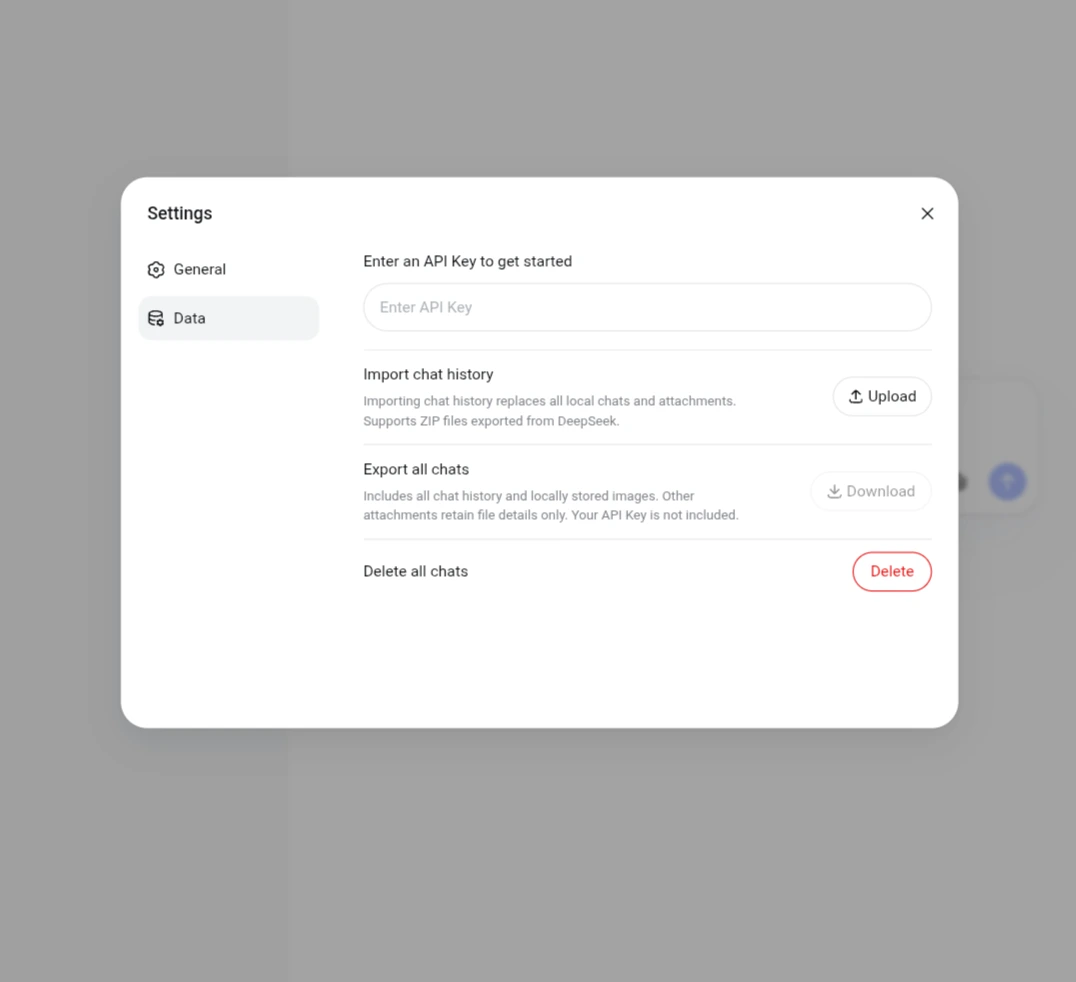
The interface also supports automatic conversation titles, message editing, response regeneration, conversation deletion, text-to-speech playback, and voice input. Another feature allows users to import conversation history previously exported from DeepSeek Chat and continue working with earlier discussions in the new interface.
DeepSeek published the project’s source code on GitHub under the MIT license and made a browser-based demo available. The company also provides documentation explaining how to build a similar chat application.
The demo stores the API key and settings in localStorage, while conversations and attachments are saved in IndexedDB. Because all credentials and data remain client-side, the project is strictly a reference prototype and should not be used with sensitive data or in production environments.
What the DeepSeek API Update Means for Developers
The update brings together several services commonly needed to build AI chat applications and intelligent agents. Developers can now access web search, page retrieval, document analysis, and audio processing through DeepSeek’s API ecosystem instead of integrating separate providers for each capability.
This is particularly relevant to applications that combine live web research with document analysis and voice responses. Examples include AI assistants, productivity tools, and document analysis platforms.
By consolidating search, parsing, and speech under one API, engineering teams eliminate the integration overhead of managing separate third-party vendors. In production, the main trade-offs shift to managing latency across multi-step tool calls and keeping per-tool usage costs predictable.
Frequently Asked Questions
Are all DeepSeek app features now available through the API?
Only the core backend capabilities-web search, URL reading, file analysis, safety checks, and audio processing-are exposed through the API. DeepSeek does not ship a hosted UI with these endpoints, so developers build their own frontend and user experience.
Which model supports the new DeepSeek API features?
The new conversation features work with deepseek-flash, which runs on the DeepSeek-V4.1-Flash-1017 model version.
Does the DeepSeek API support PDF and Word files?
Yes. It supports PDF, DOC, DOCX, PPT, and PPTX files, as well as images. Developers can choose between text extraction and layout-aware document processing.
Does DeepSeek provide standalone speech-to-text and text-to-speech APIs?
Yes. The ASR API converts audio into text, while the TTS API generates spoken audio from text. Both are available as standalone services.
Can developers import existing DeepSeek Chat conversations?
Yes. The open-source demo supports importing conversation history exported from DeepSeek Chat. Importing a new history replaces the existing history inside the demo interface.