How to Create Interactive Apps with ChatGPT Using Intelligent UI
ChatGPT can now build interactive tools directly inside a conversation instead of simply explaining how to create them or providing instructions for building them elsewhere. Ask it to create a financial calculator, a task tracker, or a color palette tool, and it can generate an interface with input fields, buttons, charts, and interactive controls that you can use immediately.
This capability is powered by Intelligent UI, a feature in GPT-6 that allows ChatGPT to combine text with visual and interactive elements based on the task. You can change values, select options, adjust sliders, and see the results update within the interface without sending a new message for every adjustment.
The difference is that ChatGPT does not just describe a tool you could build later. It creates an interactive experience directly inside the conversation. Here is how to use Intelligent UI, what you can build with it, and the prompts that can help you create more useful interfaces.
What Is Intelligent UI in ChatGPT?
Intelligent UI is a new way for ChatGPT to present its responses. Instead of limiting answers to text and traditional tables, the model can choose a suitable format for the task and combine its response with interactive elements such as charts, forms, buttons, input fields, and calculation tools.
For example, if you ask ChatGPT how to manage your monthly budget, it may provide an explanation alongside a calculator where you can enter your income and expenses. When you change an expense amount, the remaining balance and related chart update within the interface.
The same approach works for other tasks. A product comparison request may produce a structured view that makes differences easier to evaluate. A request to explain a scientific concept may generate an interactive visualization that lets you change variables and observe their effects.
The model selects the presentation format based on the request, so you do not need to activate a separate mode every time you want a chart or interface. However, if your goal is to build a specific tool, describe it explicitly and explain what you want it to do rather than asking a general question.
How to Create an Interactive Tool with ChatGPT
You can start building interactive tools from a regular ChatGPT conversation. There is no need to write code or install additional software.
Step 1: Open a New Chat in ChatGPT
Open ChatGPT in your browser or mobile app and start a regular text conversation using the standard Chat mode.
Intelligent UI is integrated into the response experience and works automatically when you submit a suitable request. No additional setup is required.
Interactive interfaces are designed for standard text conversations. They do not appear in Voice mode, the Work tab, or Pro reasoning mode.
Step 2: Ask ChatGPT to Build the Tool
Write a clear prompt that describes the tool and its purpose. For example, instead of asking for general advice about managing money, try this:
Build an interactive monthly budget tool with fields for income, expenses, savings, and remaining balance. Include a chart showing how my spending is distributed across categories.
This tells ChatGPT to create a usable interface rather than simply provide budgeting advice.
Step 3: Wait for the Interactive Interface
After you submit your request, ChatGPT starts generating the response. Some interface elements may appear while the model is still working on the rest of the content, rather than waiting for the entire response to finish.
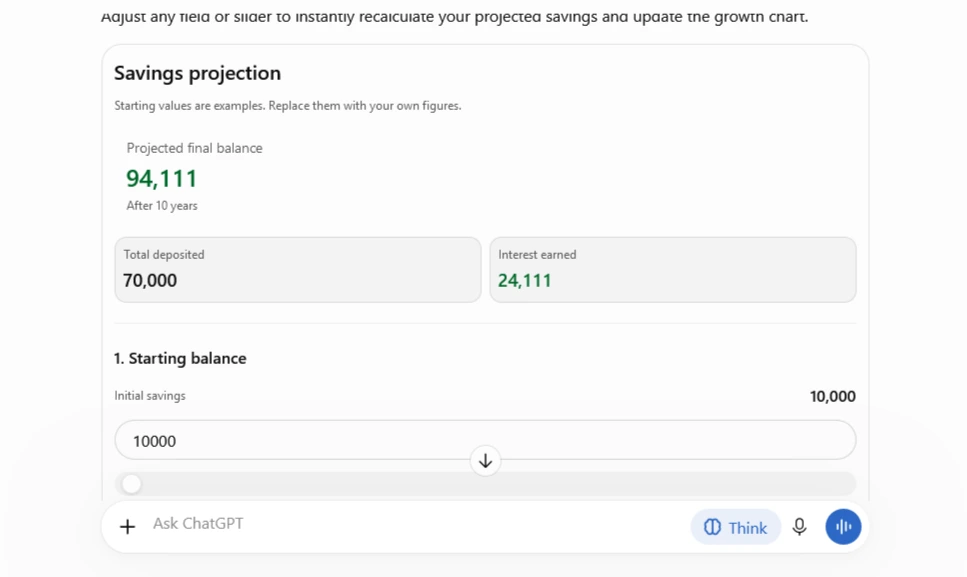
Depending on the task, the interface may include:
- Input fields for entering numbers and text.
- Buttons for performing actions or changing selections.
- Dropdown menus for choosing categories and options.
- Sliders for adjusting values.
- Charts that respond to changes in the data.
- Tables for displaying results and comparisons.
Not every response requires interactive elements. ChatGPT may still use a standard text answer when that format is more appropriate. To make your intention clear, include a phrase such as “Create an interactive interface that I can use directly inside this chat.”
Step 4: Interact with the Interface
Once the tool appears, enter your data or change its settings.
In a budget calculator, for example, enter your income and expenses, then adjust the sliders to see how increasing or reducing spending affects your remaining balance.
In a product comparison tool, select the items you want to evaluate and review their differences in price and specifications. The interaction happens within the interface itself, rather than through a series of separate questions and text responses.
Step 5: Ask ChatGPT to Improve the Tool
The first version does not have to be the final one. Continue the conversation to request additional features, a different layout, or improvements to specific elements.
For example, you could ask:
“Add an option to compare this month’s budget with last month’s spending, and show the difference in a chart.”
You could also request a different card layout or a button that resets all values.
It is usually better to make these changes gradually and test each addition before moving on to the next one.
6 Interactive Tools You Can Build with Intelligent UI
The possible uses depend on the task and the information involved. These examples show how an ordinary question can become a practical interface.
1. Savings and Investment Calculator
Ask ChatGPT to build a calculator with fields for your starting balance, monthly contributions, investment period, and annual return rate.
The interface can display the projected balance at the end of the selected period alongside a chart showing how your savings grow over time. Sliders let you adjust the figures and compare different scenarios.
This makes it easier to understand how changing your monthly contributions or expected return affects your financial projections.
2. Room Layout and Furniture Planner
You can request a visual interface for a living room, bedroom, or home office, with furniture elements that can be adjusted in size, color, and position.
Providing the actual room dimensions can help ChatGPT create a layout that better reflects your available space. The interface can then serve as a starting point for testing different furniture arrangements before making changes to the room.
3. Color Palette Generator
Ask ChatGPT to create a tool for building color palettes for a design project.
It can display a selection of colors with their HEX codes and allow you to adjust individual shades or experiment with different combinations. You can also provide a reference image and ask for a palette based on its dominant colors.
This is useful for designers, online store owners, and content creators working on visual identities or social media graphics.
4. Solar System Simulator
An interactive educational interface can display a simplified model of the solar system, with controls for changing orbital speed or other simulation variables.
Changing these values can produce a visual representation of how the model responds. This offers a more engaging way to explore planetary motion and basic astronomy concepts.
5. Travel Planner
You can ask ChatGPT to create a trip-planning tool for a particular destination. Include fields for the number of days, budget, accommodation, and suggested activities, with options to adjust the daily schedule and spending limits.
If web browsing is available and enabled, you can also ask ChatGPT to research current hotel prices and activity information. A map can help visualize the locations included in the itinerary.
6. Sales Tracking Dashboard
A sales dashboard can include fields for product names, prices, quantities sold, and sales dates. ChatGPT can use these inputs to calculate revenue and average order value, organize products by sales performance, and display interactive charts.
This can help small business owners review their sales figures without relying on a separate analytics application.
5 Prompts for Building Interactive Tools in ChatGPT
The quality of the result depends partly on how clearly you describe the tool. Do not simply mention the type of application you want. Specify the data it should accept, the results it should display, and what should happen when you interact with its controls.
Here are five ready-to-use prompts you can copy directly into ChatGPT.
1. Build a Savings Calculator
Create an interactive savings calculator inside this chat. Include input fields for starting balance, monthly contributions, annual interest rate, and savings period. Show the projected final balance and a chart of savings growth over time. Add sliders to adjust the values and update all results instantly. Clearly label the assumptions used in the calculations.
This prompt creates a calculator that projects savings growth over a selected period. You can change the monthly contribution or annual return rate and see the updated results.
2. Build an Interactive Task Planner
Build an interactive task planner inside this conversation. Let me add tasks, deadlines, priority levels, and completion status. Display tasks in a dashboard with filters for pending, completed, and overdue items. Include a progress indicator and buttons to update task status.
This creates a task management interface where you can organize deadlines, set priorities, and track completed and outstanding work.
3. Build a Product Comparison Tool
Create an interactive product comparison tool. Let me enter up to four products with their prices, features, specifications, and ratings. Display them in a comparison table. Add filters and a scoring system with adjustable weights for price, performance, and features. Update the ranking when I change the weights.
Use this prompt to compare up to four products based on price, specifications, and performance. You can adjust the importance of each criterion and see how the rankings change.
4. Build a Sales Analytics Dashboard
Build an interactive sales dashboard. Include input fields for product name, units sold, unit price, and sale date. Calculate total revenue and average order value. Show daily and monthly sales charts, with filters by product and date range. Update the charts and calculations whenever the data changes.
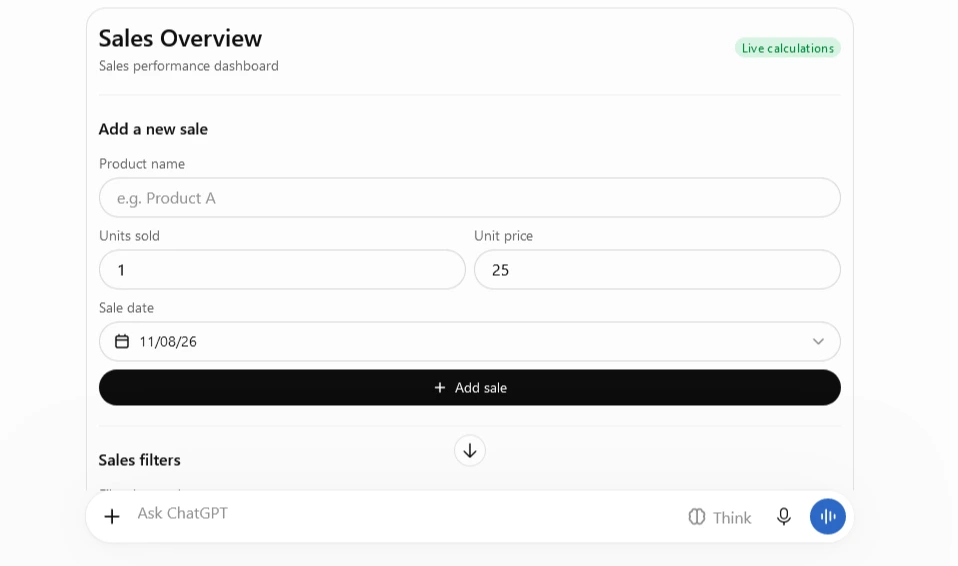
This prompt generates a dashboard for tracking revenue and average order value, with charts that respond to changes in the sales data and selected date range.
5. Build a Household Budget Simulator
Create an interactive household budget simulator. Include monthly income and expense categories such as rent, food, transport, utilities, and entertainment. Add sliders to adjust each category. Show the remaining balance, spending percentages, and a chart comparing the original budget with the adjusted budget.
This tool lets you experiment with different household spending plans and see how increasing or reducing individual expenses affects your remaining balance.
How to Get Better Results from ChatGPT Interfaces
A useful interactive tool depends less on prompt length and more on the details you provide. A few instructions can make the resulting interface considerably more practical:
- Specify the layout: Request cards, a table, a chart, or a dashboard instead of leaving every design decision to the model.
- Explain how controls should work: Describe what should happen when someone clicks a button, changes a value, or selects a category.
- Connect inputs to results: Ask for calculations and charts to update immediately whenever the underlying data changes.
- Include error handling: Explain how the tool should handle empty fields, negative numbers, and invalid values.
- Start with essential features: Build the core functionality first, then add optional features after testing the initial interface.
- Show the calculations: For financial and statistical tools, ask ChatGPT to display the formulas and assumptions behind its results.
You can also ask ChatGPT to review the interface after generating it and test specific functions to identify issues or improve how the tool works.
Can You Turn an Intelligent UI Tool into a Standalone App?
Intelligent UI is particularly useful for creating small, task-focused applications, often called micro-apps. These tools run directly inside a conversation, allowing you to handle everyday tasks without setting up a website, server, or database.
If you want to use an interface outside ChatGPT, you can ask the model to generate the source code for it. For example, request a React implementation or an HTML interface styled with Tailwind CSS.
You can then use that code as a starting point for your own project and deploy it through a suitable hosting platform.
However, generating the interface code does not automatically create a complete standalone application. Features such as user accounts, persistent data storage, external APIs, and database connections may require additional development and configuration.
Tips for Getting More Accurate and Reliable Results
To get the most out of interactive interfaces, pay attention to how the tool handles calculations, data, and user input.
- Define calculation rules: Provide the formulas and assumptions you want the tool to use, particularly for financial calculations.
- Use current data when needed: Ask ChatGPT to use web browsing for tools that depend on changing information, such as prices or market figures, when browsing is available.
- Keep important results: Export available data or save a separate copy of important outputs so you can use them outside the conversation.
- Choose suitable tasks: These interfaces are particularly useful for planning, comparing scenarios, organizing personal tasks, and building quick prototypes.
- Check important calculations: Review the formulas and results before relying on a tool for financial or business decisions.
Is ChatGPT Intelligent UI Worth Trying?
Intelligent UI introduces a practical way to create small interactive tools without programming experience or specialized external software. Its main value lies in turning everyday ideas, calculations, and educational tasks into visual interfaces that you can adjust and use directly inside a conversation.
Start with a clear request, specify the interface elements and how they should behave, then improve the tool step by step. This approach turns ChatGPT into more than a source of answers: it becomes a workspace for building interactive tools around real tasks.