Google Gemini Notebook in AI Mode: How It Connects Search With Your Personal Sources?
Following Google’s July 2026 expansion and integration of Gemini Notebook across its product ecosystem, digital notebooks are now accessible directly within the interactive AI Mode in Google Search. This development represents a direct, calculated response to the fragmented digital workflow that researchers and students face when constantly switching between traditional search engines and standalone note-taking applications. By integrating notebooks into the search interface, Google offers an organized workspace for user sources, bridging real-time search queries with personal files.
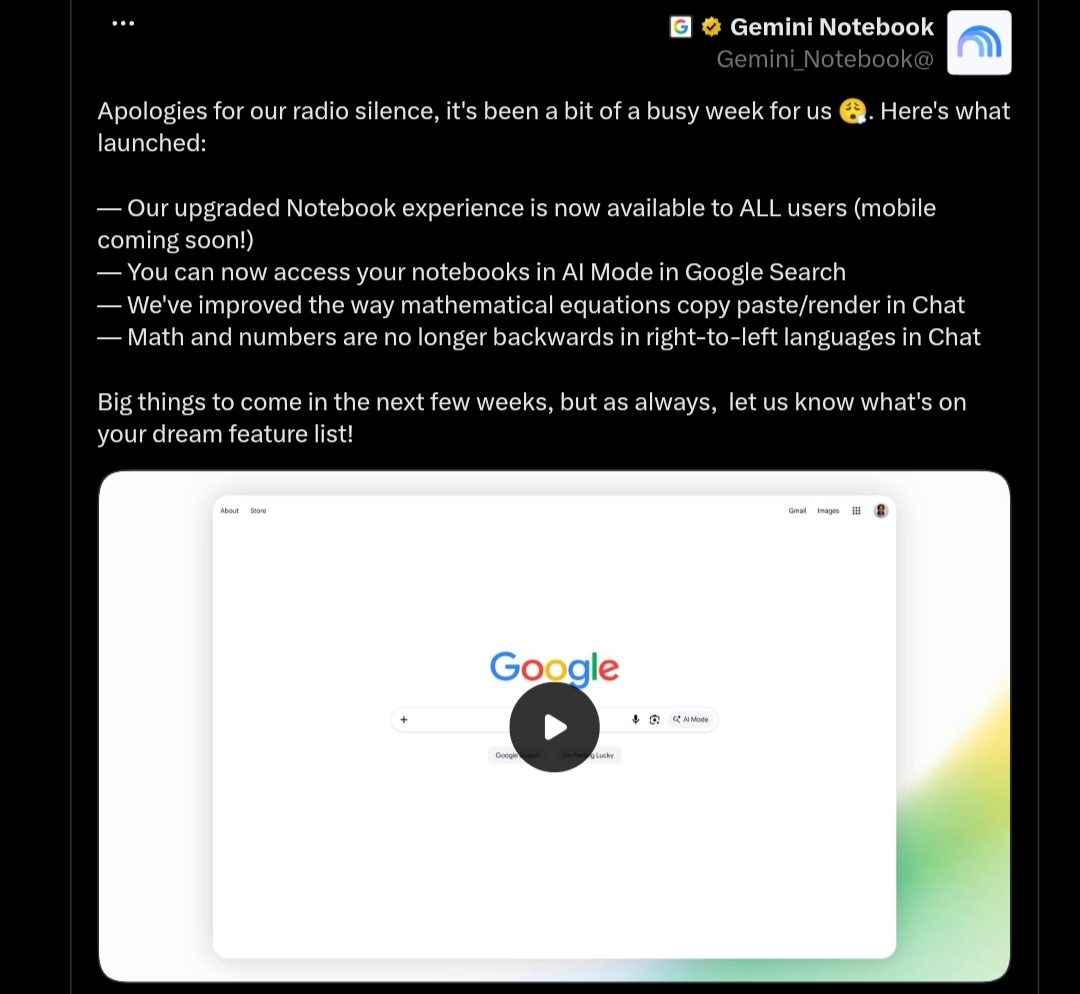
This comprehensive report provides an objective, in-depth review of the “Notebooks in AI Mode” feature. We analyze the technical rules governing cross-product syncing, essential user prerequisites, the precise architectural differences in source grounding, and the official privacy protocols and geographic boundaries.
Technical Evolution of the Notebook Ecosystem
Google’s digital notebook started as an experimental workspace in Google Labs under the name “Project Tailwind.” It eventually graduated to a standalone public tool called NotebookLM, gaining popularity for its ability to summarize large documents and analyze complex textbooks. In mid-July 2026, Google officially rebranded the tool to “Gemini Notebook” as part of its unified AI branding strategy.
Along with the new name, the transition introduced a Secure Cloud Computer to the back-end system. This architecture allows Gemini Notebook to write and execute code in a secure sandbox, helping the tool analyze structured data, interpret complex charts, and solve mathematical problems with higher precision. With this expansion, notebooks have transitioned from an isolated web tool to a connected feature across Google Search and the mobile Gemini app.
Core Workflow and Interaction in AI Mode
The “Notebooks in AI Mode” feature allows users to invoke their digital notebooks directly while generating interactive AI Overviews in Google Search. According to official Google Search documentation, this side-panel interface enables researchers and students to execute several key actions seamlessly:
- Create or Open Notebooks: Users can quickly start a brand-new notebook dedicated to their active research query or open an existing notebook created previously in their account.
- Ingest Search Inputs: Users can add files, input specific URLs, or paste text snippets manually to include them as active sources within their notebook.
- Save Search Sessions: The interface allows users to add their entire AI Mode chat thread directly into the notebook as a saved, grounded source with a single click.
Prerequisites and Cross-Product Syncing Rules
To access and use notebooks in AI Mode, Google enforces a specific prerequisite regarding account types: using notebooks in AI Mode requires a personal Google Account managed by the user.
For eligible personal accounts, data syncing across the three main surfaces-the standalone Gemini Notebook web app, the mobile Gemini app, and Google Search’s AI Mode-follows strict rules to maintain data integrity:
- Sources and Custom Instructions Syncing: Adding a new document, renaming a notebook, or changing custom instructions in any of the three interfaces updates the notebook globally. The changes sync automatically and instantly across all active platforms.
- Syncing Boundaries for Chat Sessions: Unlike sources and instructions, actual chat interactions are handled locally within their respective surfaces. AI Mode chats in your notebook are only available in AI Mode and do not sync back to the standalone Gemini Notebook app or the Gemini app. This architectural boundary prevents a user’s master notebook from becoming cluttered with short-term, casual search queries. However, depending on account settings, these Search chats may be saved separately in the user’s Google Search history.
The Critical Difference in Source Grounding
Source grounding is the primary mechanism that limits model hallucinations and ensures that AI outputs remain reliable and referenceable. However, there is a fundamental technical difference in how grounding behaves in the standalone web application compared to the AI Mode search integration:
Technical Comparison:
In the standalone Gemini Notebook web application, the AI model is strictly and exclusively grounded in the files and documents the user has uploaded. It cannot access the live web to answer questions. Conversely, when using Notebooks in AI Mode within Google Search, the model relies on the notebook’s sources as its primary anchor but is fully authorized to pull from live web search results and other connected tools. This provides a unique hybrid experience that combines the accuracy of private documents with the real-time updates of the web.
Supported File Formats and Media Ingestion
To feed research data into the notebooks, Google supports a wide array of digital formats and media sources, helping students organize diverse course materials in one place. The officially supported formats include:
- Standard text files and Portable Document Format (PDF) files.
- Cloud-based documents from Google Docs and presentation slides from Google Slides.
- Public website URLs and online articles.
- YouTube video links, as well as uploaded audio files, allowing the tool to analyze and summarize audio transcripts.
- Uploaded images and structured charts.
Standalone Gemini Notebook Features Completing the AI Mode Experience
While AI Mode provides rapid access to notebooks and search-saving features during active browsing, switching over to the standalone Gemini Notebook web application unlocks a deeper suite of generation and structuring tools that complement the research workflow. In the standalone app, users can transform the collected sources into structured outputs, including:
- Study Guides: Automatically generating structured exam summaries and outlines from uploaded materials.
- Flashcards: Creating interactive review cards for key terms and definitions to facilitate memorization.
- Audio/Video Overviews: Generating the popular audio overview feature, which translates written documents into an engaging, natural-sounding audio discussion between two AI hosts.
- Data Tables: Extracting numbers, metrics, and key data points from raw sources and compiling them into clean tables for comparison.
Academic Preparation Tools and Standardized Testing
As part of its efforts to support academic learning, Google has integrated specialized tools designed to help students prepare for high-stakes exams. This is represented in designated Study Notebooks that provide structured study aids:
- Practice Quizzes: The ecosystem allows students to generate customized mock quizzes based directly on the course notes, textbooks, and lectures stored within their private notebooks.
- Standardized Test Preparation: The initiative includes targeted preparation materials, with study notebooks tailored for standardized college entrance exams such as the SAT.
- Strategic Educational Partnerships: Google partnered with The Princeton Review to deliver verified practice questions and detailed explanations for the GRE and ACT exams. It also collaborated with Akira ENEM to offer tailored preparation materials for Brazil’s national university entrance exam, the ENEM.
Security Protocols and Privacy of Uploaded Data
Integrating personal, academic, or professional documents into a search-connected interface raises legitimate user concerns regarding data privacy. Google’s official security protocols draw a clear boundary between different types of user data:
- Private Notebook Sources: Google explicitly states that the private documents, files, and links uploaded by a user to feed their notebooks **are not used to train Google’s public generative AI models**. These sources remain private to the user’s workspace.
- Search and AI Mode Threads: In contrast to uploaded sources, the active chat threads and queries typed into the AI Mode interface are governed by Google Search settings. Depending on the user’s account configuration, these chats may be saved in Google Search history and utilized to improve and train Google’s general products and generative models.
Current Regional and Language Limitations
Despite the high utility of the integration, global readers and researchers must navigate a few technical and regional limitations during this phase of the rollout:
- Language Constraints: Notebooks in AI Mode are initially available in **English only**. This is a narrower constraint than the standalone Gemini Notebook app, which supports changing the output language to various global languages, including Modern Standard Arabic.
- Geographic Availability: The feature is live in over 180 countries where Gemini Notebook is supported; however, the European Economic Area (EEA) is currently excluded.
Educational Impact and Final Evaluation
Bringing notebooks into Google Search’s AI Mode highlights Google’s vision of a hybrid academic assistant that marries the vastness of the web with a researcher’s private document archive. The integration successfully reduces administrative overhead for students, automating the time-consuming tasks of gathering, organizing, and formatting notes.
However, educational experts suggest a balanced approach. Over-reliance on automated summaries and pre-packaged study guides risks bypassing the deeper cognitive processing associated with active reading, manual outlining, and self-directed information synthesis. When used as a complementary tool rather than a total replacement for active study, Notebooks in AI Mode stands as a highly efficient, modern workspace for the digital-first researcher.