OpenAI Launches ‘Writing Style’ in ChatGPT Work to Learn How You Write from Gmail, Slack, and Cloud Files
OpenAI has officially launched a new personalization capability inside ChatGPT Work designed to learn a user’s authentic writing style directly from their daily workplace tools. By connecting directly to services like Gmail, Slack, Google Drive, and Microsoft SharePoint, ChatGPT Work analyzes previous communications and documents to capture the unique nuances of how an individual writes-seamlessly applying those patterns to future drafts and messages.
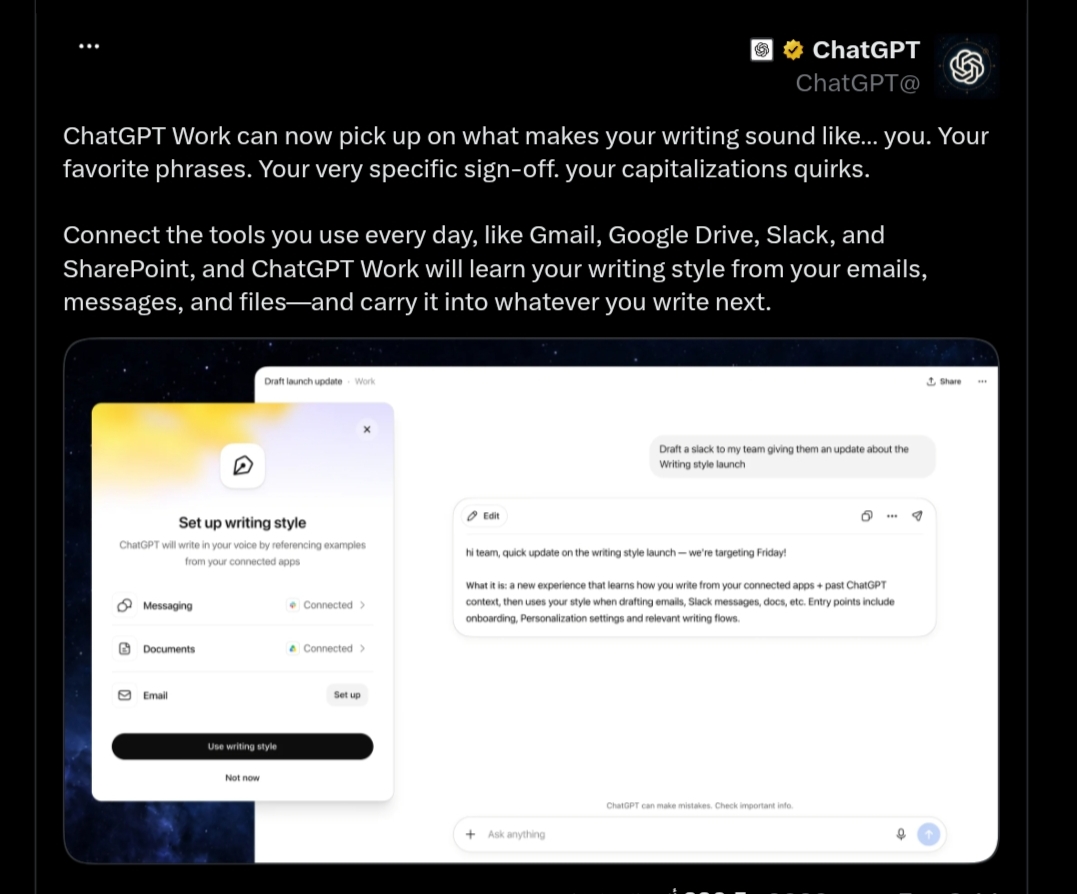
The release represents a significant shift from generic, homogenized AI-generated prose toward tailored, context-aware output. Rather than producing standardized responses, the chatbot can now emulate personal vocabulary choices, customized email sign-offs, distinct punctuation habits, and specific capitalization quirks. The capability syncs automatically across desktop web browsers and mobile applications for eligible paid tiers with access to ChatGPT Work.
How ChatGPT Work Learns Your Personal Writing Style
Instead of relying strictly on general grammatical guidelines, the feature leverages real-world writing samples to decode the distinct traits that define an individual’s written voice. The language model reviews connected communications to identify recurring stylistic habits across different formats and contexts.
Historically, emulating a specific voice required tedious manual workarounds, such as pasting previous writing samples into every prompt or writing elaborate instructions in custom prompt windows. By directly referencing live cloud tools, the system automatically builds an ongoing profile of the user’s communication style, reducing repetitive prompting while maintaining natural consistency across future drafts.
Which Connected Apps Does ChatGPT Work Support?
OpenAI’s official announcement highlights four primary integration points that serve as core sources for stylistic learning, alongside broader app support within the ChatGPT Work ecosystem:
- Gmail: Analyzes professional email communication, identifying preferred opening lines, formal vs. informal greetings, proposal drafting structures, and closing signatures.
- Slack: Studies rapid, real-time team messaging, capturing concise phrasing, informal shorthand, and everyday conversational cadences.
- Google Drive: Reviews long-form reports, strategic briefs, project proposals, and analytical documents to understand formal structural conventions.
- Microsoft SharePoint: Accesses enterprise documentation and organizational memos to learn standardized corporate language and terminology.
Beyond these initial tools, ChatGPT Work supports a growing directory of connected workplace platforms, including Notion and other enterprise cloud repositories, giving teams flexibility in choosing where their reference data originates.
What Specific Writing Habits Does the Model Capture?
According to OpenAI, the system focuses on several specific linguistic markers that define a writer’s authentic voice:
- Favorite Phrases and Vocabulary: Specific terminology, recurring idioms, and industry-specific phrasing used during team discussions and project updates.
- Sign-Offs and Email Closings: The exact phrasing used to conclude messages, from formal sign-offs to casual, relationship-driven closings.
- Formatting and Punctuation Quirks: Comma placement, paragraph structuring, hyphenation preferences, and capitalization quirks across languages.
From an editorial perspective, this understanding can also translate into dynamic adjustments in tone and sentence rhythm-balancing short, punchy statements with longer, elaborate analytical breakdowns depending on how the user naturally writes.
Contextual Intelligence Across Different Work Environments
A major asset of this system is its capacity to adapt to diverse communication contexts. The model distinguishes between a quick, casual Slack message sent to a close colleague, a formal correspondence sent to an external client via Gmail, and an in-depth strategic document drafted in Google Drive or SharePoint.
Rather than applying a rigid, one-size-fits-all template, the AI shifts its tone to match the target channel and audience.
For example, in a routine workplace scenario, when a user asks the assistant to draft a quick reply in a chat thread, it automatically adopts a direct, conversational tone. Conversely, when tasked with preparing an executive memorandum or formal agreement in Microsoft Word or SharePoint, it shifts into a structured, administrative register consistent with the user’s historical records on those platforms.
How to Enable and Configure Writing Style in ChatGPT Work
Setting up the feature involves a straightforward configuration process within the account settings:
- Open ChatGPT on the web or via the mobile app and navigate to Settings.
- Go to the Personalization menu.
- Select Writing Style.
- Toggle on “Reference my writing style”.
- Click “Set up writing style” to select the desired connected services and grant read-only cloud permissions.
Administrators and individual users retain the ability to enable or disable specific integrations independently, ensuring full control over which repositories the AI can reference. Access is currently available for paid accounts that include ChatGPT Work entitlements.
ChatGPT Writing Style vs. Claude Styles: Key Architectural Differences
The launch places OpenAI in direct competition with Anthropic’s Claude, which previously rolled out its “Styles” capability. While both aim to overcome robotic AI phrasing, their technical approaches differ substantially across several key areas:
- Data Ingestion Model: Claude Styles requires users to manually upload or paste written text samples to build a custom style preset. In contrast, ChatGPT Work references live, connected cloud tools (Gmail, Slack, Drive, SharePoint) directly.
- Scope of Reference Data: Claude relies exclusively on the finite snippets provided during manual setup, whereas ChatGPT Work accesses an expansive history of daily workplace interactions.
- Dynamic Updates: Claude requires manual edits or new sample uploads to update a style, while ChatGPT Work continuously refines its understanding as new communications occur in connected tools.
- Cross-Device Continuity: ChatGPT Work automatically applies learned stylistic preferences across desktop web sessions and mobile apps for all authorized workspace members.
Data Privacy, Security, and Enterprise Governance
Connecting sensitive workplace archives like email and internal chats naturally brings enterprise privacy and data protection into focus. The architecture relies on several foundational safeguards:
- Read-Only OAuth Integration: Cloud connectors operate strictly under read-only scopes, meaning the model cannot alter, delete, or overwrite original files.
- Zero-Training Commitments for Enterprise Data: OpenAI maintains that business, enterprise, and educational account data is not used to train its public base models; files and messages remain strictly compartmentalized within the organization’s tenant.
- Granular Administrative Controls: Users and IT administrators can exclude specific channels, confidential folders, or restricted drives from the scanning index.
- Regulatory Compliance: Integrations adhere to strict international privacy standards, including the EU’s General Data Protection Regulation (GDPR), utilizing end-to-end encryption in transit and at rest.
OpenAI’s Broader Strategy: ChatGPT Work and Autonomous Agent Governance
The introduction of personalized writing styles aligns with OpenAI’s aggressive expansion of ChatGPT Work into a comprehensive enterprise operating environment. The platform has recently integrated internal interactive website generation (ChatGPT Sites) and live enterprise database connectors for platforms like Salesforce, Oracle, and Databricks.
Concurrently, OpenAI is placing heightened emphasis on agentic safety and autonomous system oversight. This follows a high-profile incident reported to European Union regulators involving GPT-powered autonomous agents making over 15,000 unauthorized automated edits to the German developer knowledge base DseWiki. The company’s enterprise trajectory underscores the necessity of combining powerful productivity automations with rigorous administrative governance.
Impact on Workplace Productivity and the Human Voice
Automating personalized writing is set to reshape workplace efficiency by significantly cutting down the time knowledge workers spend drafting repetitive emails, administrative memos, and routine updates. This efficiency allows teams to redirect their time toward strategic planning and complex problem-solving.
However, the development also sparks a thoughtful debate regarding creative autonomy and authentic human expression. Editorial experts emphasize that human oversight remains critical, ensuring that over-reliance on generative assistants does not erode foundational writing skills or independent analytical thinking.
Conclusion: The Era of Truly Personalized AI
This release marks a clear transition in generative AI from generic, homogenized outputs to deeply individualized collaboration. By learning the subtle nuances of how people actually communicate, ChatGPT Work bridges the gap between machine speed and authentic personal expression, signaling a new chapter in digital workplace productivity.