VEED.io: Create, Edit, and Translate Videos with AI
What Is VEED.io?
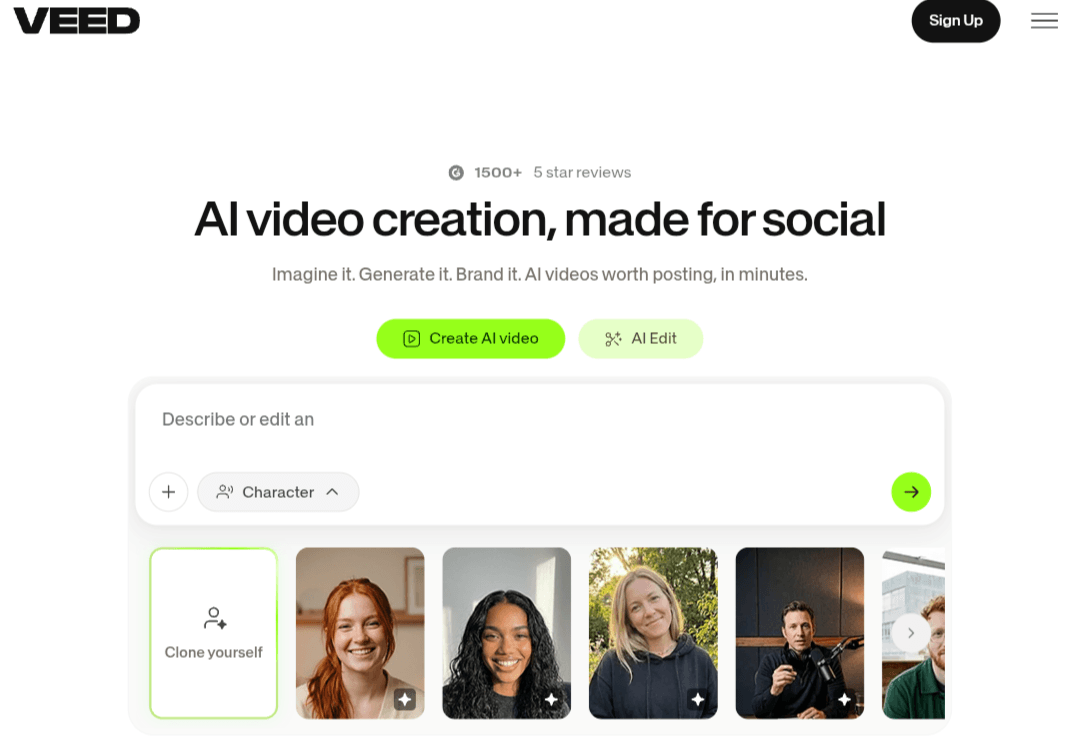
VEED.io is an online, browser-based video editing platform that combines traditional timeline tools with generative AI capabilities, including auto-subtitles, background noise removal, text-to-video generation, and multilingual voice dubbing. The platform enables content creators, marketers, educators, and teams to cut, resize, and brand video content directly inside web browsers without downloading or installing standalone desktop software. It also features built-in screen and webcam recording, social-ready aspect ratio presets, and centralized team workspaces.
Core Features and Tools of VEED.io:
VEED.io’s toolset covers the entire video production workflow, from initial concept to final export:
1. AI Video Creation and Content Generation
- Text to Video:Enter a brief prompt or paste a complete script, and the system automatically matches relevant b-roll footage, generates a voiceover, and adds synced background music tailored to your pacing.
- AI Avatars:A library of lifelike digital presenters spanning diverse demographics. Select an avatar and input your script to produce professional talking-head videos with accurate lip-syncing without cameras or physical studio lighting.
- Text to Speech:Convert written text into human-sounding voiceovers across dozens of languages and accents, with granular controls over pacing, pitch, and delivery tone.
- Voice Cloning:Record a brief sample of your voice to train a personalized digital voice replica, enabling fast voiceover production for future tutorials and presentations without repeated recording sessions.
- AI Script Writer:Draft commercial scripts, video outlines, and short-form hooks by providing keywords and outlining your target audience.
2. AI Video Editing and Audio Enhancement
- Auto Subtitles:Automated speech-to-text with high accuracy across over 100 languages. Customize captions using dynamic typography, karaoke animations, and trending social styles popular on TikTok, Shorts, and Reels.
- Clean Audio:One-click background noise removal that isolates dialogue by eliminating wind hum, HVAC noise, traffic, and room echo, mimicking professional studio microphone quality.
- AI Eye Contact:Reroutes pupils toward the camera lens if you are reading notes or teleprompters off-screen, maintaining natural, direct engagement with viewers.
- Remove Filler Words & Silences:Detects and cuts dead air, long pauses, and filler vocalizations like “um” and “uh” automatically to streamline video pacing.
- Video Translation & Dubbing:Translates audio into global languages with automated voice dubbing and lip-movement matching so the translated video appears natively recorded.
3. Core Video Editing and Media Tools
- Trim, Split & Merge:Streamlined multi-track timeline controls to cut unwanted clips, rearrange sequences, and merge multiple video tracks via drag-and-drop.
- Screen & Cam Recorder:Capture browser tabs, application windows, or full desktops with an optional circular webcam overlay directly from the browser window.
- Auto Resize:Quick aspect ratio reformatting for vertical mobile displays (9:16), widescreen YouTube viewing (16:9), or square feed posts (1:1) while keeping primary focal points centered.
- Stock Media & Effect Library:Access thousands of royalty-free stock clips, sound effects, ambient background audio tracks, stickers, and transitions ready for commercial use.
4. Collaboration and Team Workspaces
- Shared Workspaces:Collaborate on shared projects in the cloud, manage reviewer permissions, share preview links, and collect frame-accurate timecoded comments from team members and clients.
- Brand Kits:Store corporate typography, logos, motion watermarks, and hex color palettes in a centralized directory to maintain visual brand consistency across all exported media.
Who Should Use VEED.io?
The platform caters to a diverse range of creators and digital professionals:
- Content Creators & Social Video Producers: Produce daily Reels, Shorts, and TikTok videos quickly with animated captions that capture viewer attention within the first three seconds.
- Marketers & Startups: Create product demos, feature explainers, and high-converting video ads cost-effectively without outsourcing to expensive video production agencies.
- Educators & Workshop Hosts: Record technical desktop walk-throughs, complete with automated lesson transcripts that make learning materials accessible and easy to review.
- Podcasters: Convert audio tracks into engaging audiograms featuring dynamic waveforms and animated captions to cross-promote episodes across social feeds.
- HR & Internal Communications Teams: Build streamlined onboarding videos and company-wide training modules using AI avatars without occupying internal production resources.
VEED.io Plans and Pricing
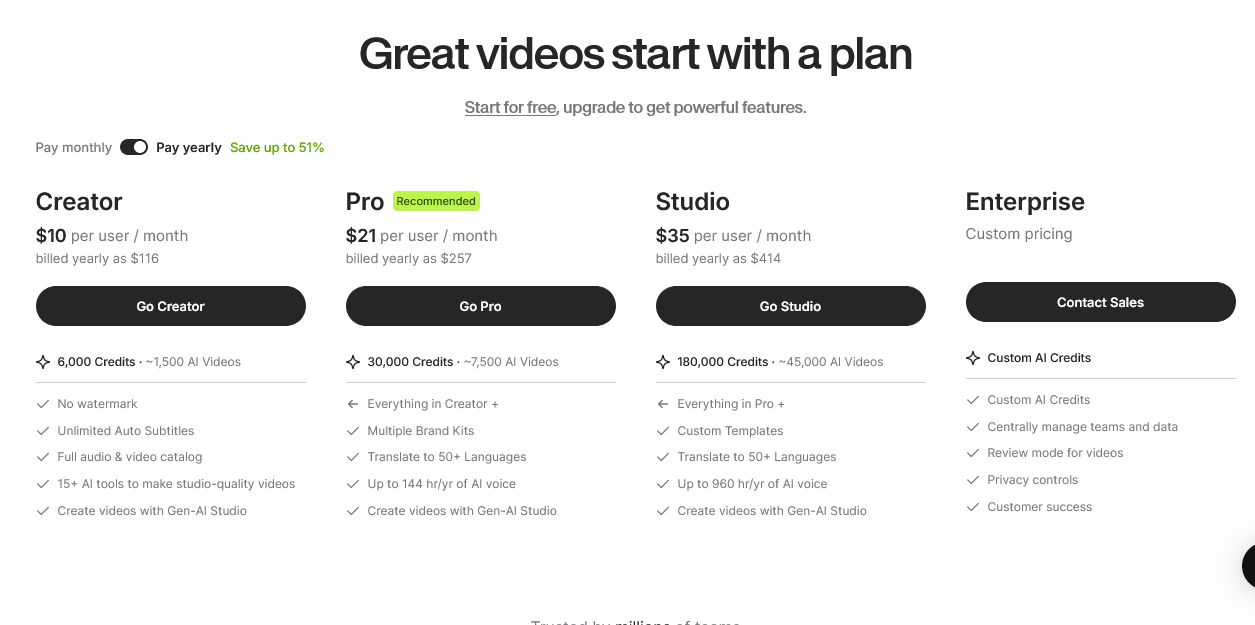
VEED.io provides tiered subscription plans structured around usage needs, feature access, and AI generation credits, accommodating solo creators, growing teams, and enterprises. The plans featured on the official pricing page include Creator, Pro, Studio, and Enterprise, each offering progressively higher export resolutions, cloud storage capacities, and monthly transcription minutes.
The graphic below outlines the full breakdown of plan names, current price tiers, and specific feature allocations according to the official VEED.io pricing schedule.
Limitations to Consider Before Subscribing
Before committing to a paid tier, keep the following considerations in mind:
- Free Tier Restrictions:The free version applies a visible VEED watermark to all exported videos and caps export lengths and resolutions at 720p, making it unsuitable for commercial deployment.
- Reliance on Stable High-Speed Internet:Because rendering, editing, and timeline processing take place in the cloud, users on slow or unstable connections may experience rendering delays when uploading large raw 4K video files.
- Nuanced Terminology Requires Verification:While automated transcription accuracy is exceptionally high, niche industry jargon, heavy accents, or regional colloquialisms may require occasional manual verification inside the text panel before finalizing the export.
- Recurring Subscription Costs:Ongoing monthly or annual billing may feel substantial for casual hobbyists or individuals who only edit a single video every few months.
Frequently Asked Questions About VEED.io
Q1: Do I need a high-spec computer to run VEED.io?
A: No. Because video rendering, effects encoding, and timeline operations execute entirely on cloud servers, all you need is an up-to-date web browser and a stable internet connection.
Q2: Does the subtitle generator accurately support multiple languages?
A: Yes. The speech recognition engine supports over 100 languages, including multiple regional dialects and accents, and includes an intuitive side-panel editor for rapid manual corrections.
Q3: What is the maximum export resolution available?
A: Higher-tier plans support exports up to 4K Ultra HD. Pro plans offer full 1080p Full HD resolution, while the free tier is restricted to 720p output.
Q4: Do I own full commercial rights to my exported videos?
A: Yes. Subscribing to any paid plan grants full commercial usage rights for all exported videos, including any royalty-free footage, music, and sound effects incorporated from the media library.
Q5: Does VEED.io support automated voice dubbing and video translation?
A: Yes. The built-in translation engine transcribes spoken dialogue and generates translated synthetic voiceovers, complete with lip-sync technology to match mouth movements to the new audio track.
Q6: Can multiple team members collaborate on the same project?
A: Yes. Team and Enterprise plans feature shared cloud workspaces where teammates can edit media simultaneously, organize shared brand assets, and leave frame-accurate timecoded comments on video drafts.